Solid File System OS edition5.0
Publisher Description
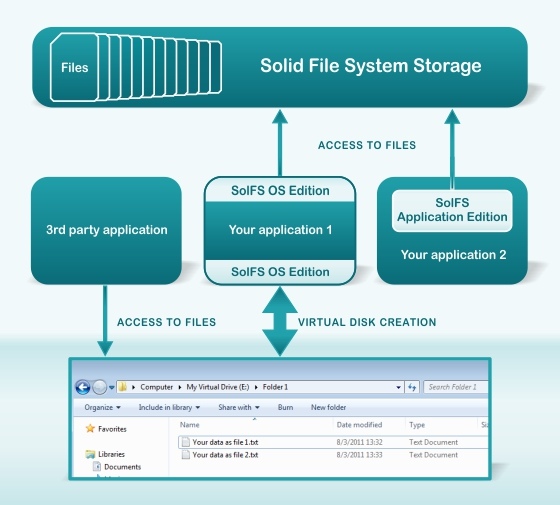
With With Solid File System OS edition your application can create a virtual disk, accessible for all or chosen processes. This disk can be made visible to the user, as a regular disk. The virtual disk (storage) is formatted using SolFS file system.
SolFS is is a virtual file system, stored in single file (or database record, file resource, memory block or even cloud storage). SolFS has all necessary functionality, that can be found in modern file systems, such as support for streams inside of files, file and stream encryption, compression, journalling (support for data integrity), file and storage metadata, symbolic links etc.
Using SolFS you can simplify or completely solve the problem of managing large number of supplementary files, needed to your application. Now your customers won't be confused by unknown files, populating their disk drive. Also the problem of accidental file deletion is solved: all files are kept in one place out of user's touch. When you use one file (file system storage) application maintenance and user support becomes much easier.
About Solid File System OS edition
This Components & Libraries program is available in English. It was last updated on 29 September, 2026. Solid File System OS edition is compatible with the following operating systems: Windows, Windows-mobile.
The company that develops Solid File System OS edition is EldoS Corporation. The latest version released by its developer is 5.0. This version was rated by 2 users of our site and has an average rating of 3.0.
The download we have available for Solid File System OS edition has a file size of 26.2 MB. Just click the green Download button above to start the downloading process. The program is listed on our website since 2014-01-31 and was downloaded 300 times. We have already checked if the download link is safe, however for your own protection we recommend that you scan the downloaded software with your antivirus. Your antivirus may detect the Solid File System OS edition as malware if the download link is broken.
How to install Solid File System OS edition on your Windows device:
- Click on the Download button on our website. This will start the download from the website of the developer.
- Once the Solid File System OS edition is downloaded click on it to start the setup process (assuming you are on a desktop computer).
- When the installation is finished you should be able to see and run the program.
Program Details
System requirements
Download information
Pricing
Version History
version 5.0
posted on 2014-01-31
* possibility to mount the file system as a plug-n-play device, so that the disk becomes visible in device manager;
* possibility to set custom disk icons in Explorer;
* support for multi-file containers;
* support for Windows 8 and Windows 2012 Server
